
Singapore, Oct. 22, 2026 (GLOBE NEWSWIRE) — SV Number gives AI agents temporary phone numbers for receiving SMS verification codes through its Model Context Protocol (MCP) server and API, allowing software to handle phone verification within online workflows.
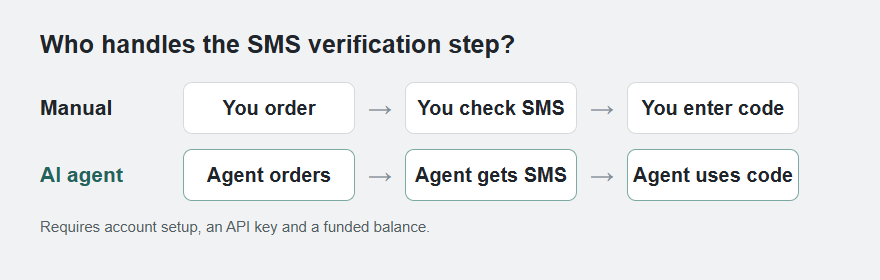
Manual and AI-agent SMS workflows. After setup, an agent can request a number and retrieve a code through SV Number; acceptance depends on the online service.
An agent can read a web page or fill in a form, but an SMS check requires access to a phone number and its incoming code. SV Number makes both available as tools. After the owner connects an account and funds its balance, the agent can request a number for a selected service and country, wait for the code and pass it to the workflow it is carrying out.
Once configured, the agent can handle the SMS step without a team member buying each number and checking for each code. The owner can use a rented number instead of supplying a personal phone number to the service being verified. Checking price and availability before ordering lets the workflow decide whether to proceed with the selected service and country.
SV Number rents phone numbers for 20 minutes
SV Number rents each phone number for a 20-minute activation window. The number is assigned exclusively to the customer during that period. The integration receives incoming verification codes; it does not provide voice calls or outgoing SMS.
The SV Number MCP server provides nine tools. These include list_services for finding a service, order_number for renting a number, wait_for_code for retrieving the SMS code and finish_activation for closing a completed activation. Agents can check the current price and stock before placing an order. Where delivery statistics are available for a service and country, those statistics are included in the service lookup.
A typical workflow follows these steps:
- A typical workflow starts with the agent checking whether the required online service has numbers available in the chosen country.
- It then orders a number, enters it in the verification form and waits for the incoming SMS.
- When the code arrives, the agent retrieves it through the integration and supplies it to the form.
- The agent can then finish the activation.
The owner sets up the account, API key and balance before the agent begins. A successful SMS receipt does not guarantee that an external service will approve an account. Acceptance depends on that service’s requirements and the number selected.
Connect an AI agent to SV Number
The MCP server can be connected to Claude Code, Cursor and other clients that support MCP configuration. Teams can also call the SMS API directly or use the published agent skill, which documents the requests used to order a number, retrieve a verification code and close the activation. The same account balance is used for these requests.
Pricing and availability
Pricing is pay-as-you-go, with no subscription required for the SMS API. The price of an activation depends on the selected service and country and is shown before an order is placed. If no SMS arrives, the activation charge is returned to the customer’s SV Number account balance. Live prices and availability can change.
Connection instructions, the agent skill and current product details are available on the SV Number phone numbers for AI agents page. The SV Number MCP server repository provides installation instructions and the tool reference.
About SV Number
SV Number provides temporary phone numbers for receiving SMS verification codes. Customers rent a number for a selected online service and country, with a 20-minute activation window. AI agents and software can access numbers and incoming codes through the API or MCP server.
Press Inquiries
Daniel Tan
press [at] sms-verification-number.com
https://sms-verification-number.com/


